
 Alex Tamm
Table of Contents
Converting Monero (XMR) to Ethereum (ETH) is straightforward when you use a wallet-to-wallet cryptocurrency swap. Instead of selling XMR for cash and buying Ethereum again, you can exchange XMR directly for ETH in a single transaction. Most non-custodial swap services let you complete the process without creating an account, while allowing you to receive Ethereum directly into your own wallet — on the network you choose.

In this guide, you’ll learn how to convert XMR to ETH step by step, what you’ll need, how fixed and floating rates differ, how long it takes, what fees to expect, and the common mistakes to avoid.
Why Convert Monero to Ethereum?
To move value out of a private, held asset and into ETH so you can actually use it — DeFi, staking, on-chain apps, or general access to the Ethereum ecosystem. Monero is private and largely a store of value; Ethereum is the base asset for on-chain utility. If your XMR is sitting idle and you want to deploy it, an XMR to ETH swap is the clean route.
The two run on separate chains — Monero has its own private chain, Ethereum a transparent public one — so this is a cross-chain swap, not a wallet transfer. You can’t simply “move” Monero into an Ethereum wallet.
One honest note up front: Monero is private; Ethereum is transparent — more on that below. This is a conversion into an open ledger, done for utility, not concealment. Weighing whether to convert at all is an investment question, not a how-to one — see the ETH outlook and the XMR outlook for that. This guide is the how.
Godex.io is a non-custodial instant cryptocurrency exchange operating since 2017. It supports 936+ coins, requires no registration or KYC at any transaction size, and offers both fixed-rate and floating-rate swap modes. Processing time is 5–30 minutes after deposit confirmation.
What You Need Before You Start
You need three things: the Monero you want to swap, an Ethereum wallet on the network you want, and a browser. No account, no email, no ID.
- Monero to swap — held in a Monero wallet you can send from (Cake Wallet, Feather, the official Monero GUI/CLI, or an exchange-managed XMR wallet).
- An Ethereum wallet that gives you a
0xreceiving address — MetaMask, Rabby, Ledger, Trezor, or Exodus. A non-custodial wallet means you hold the keys; no third party controls the funds. ETH is Ethereum’s native currency, so you don’t need to add a token contract to receive it. On a hardware wallet (Ledger, Trezor), receiving needs no device confirmation — you only plug in when you later use the ETH; just make sure the address you copy is on the network you selected. - A browser — desktop or mobile works.
What you do not need: no account, no email, no phone number, no passport or selfie, and no upper volume cap. You can swap XMR to ETH without KYC at any amount. The one decision that matters before you start is which network you want your ETH on — that’s Step 1.
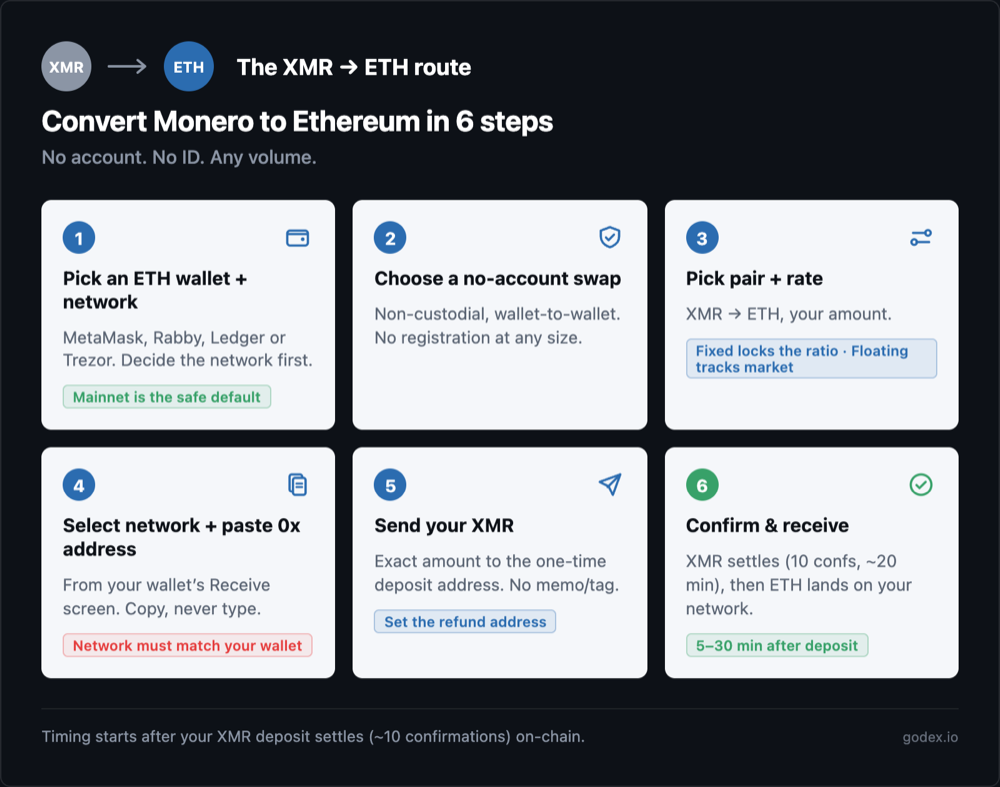
Step 1 — Pick an Ethereum Wallet and Decide the Network
Pick an Ethereum wallet you control, then decide which network you want your ETH on. This is the decision that trips people up, so settle it before you swap. ETH is the native currency of Ethereum — not an ERC-20 token — so receiving it needs no token contract. What matters is the network.
ETH exists on Ethereum mainnet and on EVM Layer 2s (Base, Arbitrum, Polygon, and others), and a 0x address looks the same on all of them:
- Ethereum mainnet — the default. Widest support; every wallet and app works with it. Receive here unless you have a specific reason not to.
- Layer 2 (Base, Arbitrum, Polygon) — cheaper gas every time you later transact, which for active DeFi use adds up fast — but only if your wallet and the swap both support ETH on that L2. Before you pick an L2, verify your wallet can actually hold it: open your wallet’s network list (in MetaMask, the network dropdown / “Add network”), confirm the L2 is already added, and check you can switch your wallet to it. If you can’t see that network in your wallet, receive on mainnet instead — don’t pick an L2 your wallet can’t hold.
The rule: receive on the network your wallet supports and the swap offers — Ethereum mainnet is the safe default. The wallet is non-custodial, so you hold the keys and the ETH lands straight in your wallet. Set one up from ethereum.org’s wallet guidance.
Step 2 — Choose a Non-Custodial, No-Account Swap
Choose a non-custodial exchange that supports the XMR to ETH pair without registration. Godex.io is the path this guide uses: it has run since 2017 across 936+ coins, asks for no account or ID at any volume, and settles the swap wallet-to-wallet.
For this pair, “non-custodial, no-account” buys you something concrete: no identity attaches to the swap, no account to create, and no upper limit on the amount. You provide a receiving address; the exchange never holds your funds on a balance.
Before you start, make sure you’re actually on godex.io — bookmark it. (godex.pro is a known scam; the official platform is only at godex.io.)
When you’re ready, swap XMR to ETH on Godex — that’s the page where this route happens. Prefer to see the screens first? Here’s the exact Godex walkthrough, step by step. Comparing providers first? See XMR to ETH without registration.
Step 3 — Select the Pair and Choose Fixed or Floating Rate
Set “you send” to XMR and “you get” to ETH, enter your amount, then choose your rate mode. Size doesn’t change the process — a larger amount triggers no extra verification, so a big swap behaves exactly like a small one.
- Fixed rate locks the XMR/ETH ratio the moment you start — the ETH figure you see is what you receive, regardless of market movement while the deposit confirms. You pay a small spread for that certainty. It matters most on larger swaps, where a few points of drift is real money.
- Floating rate stays exposed to the market until the deposit confirms. Fine for small swaps, where a few minutes of drift is trivial.
One thing to watch on this pair: a fixed-rate quote has a 30-minute window on Godex — deposit within 30 minutes of creating the transaction, or the rate refreshes. Monero’s ~20-minute, 10-confirmation settle can bump right up against it, so send your XMR promptly with a normal or priority fee. If your deposit lands after the window lapses, the swap re-rates; you’ll typically be shown the new rate to accept or decline before it proceeds. Fixed protects you against market drift — it does not wait forever.
Step 4 — Choose the Network and Paste Your Ethereum Address
This is the make-or-break step on this pair. In the swap, select the network you want your ETH on — Ethereum mainnet (the safe default) or an L2 your wallet supports. The network selector usually sits right next to the ETH “you get” field, so you may set it at the same time as the pair in Step 3. Then open your Ethereum wallet, copy your 0x receiving address, and paste it into the swap’s ETH address field — then triple-check it. Use copy-paste or the QR code; never type a crypto address by hand.
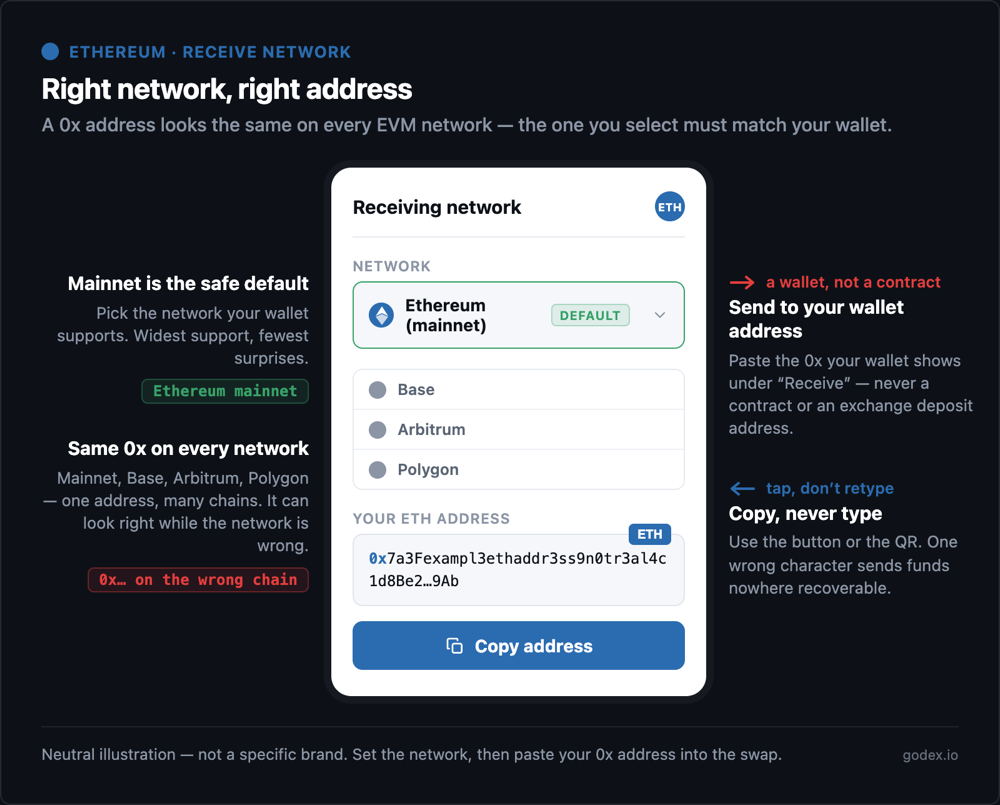
The wrong-network risk is the classic loss on this pair, so slow down here:
- A
0xaddress looks identical on every EVM network — the same address is valid on Ethereum mainnet and on every EVM Layer 2 (Base, Arbitrum, Polygon, BNB Chain). It can look right while the network is wrong. The network you select in the swap must match the network your wallet is set to receive on. - Know which mistakes are recoverable and which aren’t. Sent ETH to the wrong EVM L2 but you control the
0xaddress (same seed phrase)? The funds are reachable — add that network to your wallet and switch to it. The one that’s gone for good is a different chain type entirely: if the swap only offers EVM networks and you send to a wallet on a non-EVM chain where your key derivation doesn’t apply, the ETH can be lost for good. This is why mainnet is the default — it sidesteps both. - Send to a normal wallet address, not a contract — paste your own wallet’s receive address (the one your wallet shows under “Receive”), never an address you copied from a block explorer or an exchange deposit page. Those are the two places the wrong-address mistake actually comes from.
- You don’t need gas to receive. Receiving ETH costs you nothing — gas is paid by the sender. You pay gas only later, when you use the ETH on-chain.
- Copy, never type, and if the destination is new, consider a small test amount first.
Step 5 — Send Your XMR to the One-Time Deposit Address
The exchange shows a one-time Monero deposit address for this specific swap. Open your Monero wallet (Cake Wallet, Feather, or the official GUI/CLI), send the exact XMR amount quoted to that address, and broadcast. The swap starts once your XMR deposit confirms on-chain.
- No memo or destination tag for the Monero send. Monero uses stealth addresses natively, so there’s no separate tag field (unlike XRP or XLM). Leave any tag field blank.
- The deposit address is single-use for this swap — don’t reuse it for a later one.
- Send the exact amount quoted. Under- or over-sending can delay the swap or trigger a re-rate.
- Set the refund XMR address. On a no-account flow this is your only recovery path if the deposit under-fills or the swap can’t complete — do it, don’t skip it.
Step 6 — Wait for Confirmations and Receive Your ETH
Monero locks each transaction for 10 confirmations — about 20 minutes at its ~2-minute block time — before the deposit fully settles. The exchange then sends your ETH on the network you selected. On Godex the swap completes 5–30 minutes after the deposit is received.
Track the whole thing by transaction ID (txid) — no login needed — as the status moves through deposit received → exchanging → sending → complete. To verify on-chain, check your Monero txid on a Monero block explorer, and the ETH arrival on Etherscan (or the matching L2 explorer if you received on a Layer 2).
If the swap says complete and the explorer shows your ETH arrived, but your wallet looks empty — you’re almost certainly viewing the wrong network in your wallet. Switch your wallet to the network you received on (mainnet, or the L2 you selected) and it appears. This is the single most common false alarm on this pair, not a lost-funds event. If a swap genuinely takes longer than you expect, 24/7 support can step in with your txid.
How Long Does an XMR to ETH Swap Take?
An XMR to ETH swap usually completes in about 20–35 minutes. Monero requires 10 confirmations — roughly 20 minutes at its ~2-minute block time — to settle the deposit; then the ETH is sent on your chosen network. On Godex the swap completes 5–30 minutes after the deposit is received.
Monero’s 10-confirmation unlock is the main variable here — the deposit side is slower than a fast-chain input, because the network won’t treat your XMR as settled until those confirmations land. The ETH send that follows is quick, though Ethereum mainnet gas conditions can add a little time. Always read swap timing as “after the deposit is received,” not from the moment you click start.
What Fees Should You Expect on an XMR to ETH Swap?
Two costs sit on an XMR to ETH swap, and neither is a separate up-front “swap fee”:
- The Monero network fee. When you send XMR to the deposit address, your Monero wallet pays a small miner fee to the Monero network — not to the exchange. Monero fees are low, and your sending wallet sets it (normal or priority), so it’s usually negligible.
- The exchange’s spread. A non-custodial swap doesn’t bill a visible line-item fee — its margin is built into the rate you’re quoted. The “you get” ETH figure is already net of that spread, so what you see is what arrives. A fixed-rate quote carries a slightly wider spread than floating, because you’re paying for rate certainty while your deposit confirms.
One thing that is not charged to receive: Ethereum gas. Receiving ETH costs you nothing — gas on the send is paid by the sender, and gas on Ethereum is only paid when you use the ETH later (a DeFi trade, a stake, an on-chain interaction). So the swap doesn’t bill you gas; that cost only shows up when you start putting the ETH to work. Because a swap’s cost is baked into the rate rather than shown as a percentage, the figure that actually matters is the quoted “you get” amount — that’s your real, all-in result in a single number. Read that, not a headline fee.
Is Ethereum Anonymous Like Monero?
No. Monero is private — stealth addresses, ring signatures, and RingCT hide the sender, receiver, and amount on-chain. Ethereum is the opposite: a fully transparent, permanent public ledger. Every Ethereum address and every transaction is visible and traceable by anyone, forever.
Converting XMR to ETH moves value from a private ledger onto a transparent one. That’s the honest asymmetry of this pair, and it’s worth stating plainly: a non-custodial swap keeps the swap itself account-free, but it does not make your ETH private. Once a 0x address is known, anyone can follow it. You convert XMR to ETH to use the ETH — for DeFi, staking, and on-chain apps — not to hide it. If privacy is the goal, ETH is the wrong destination; if utility is the goal, this is exactly the right route.
Common XMR to ETH Mistakes to Avoid
Most XMR to ETH issues come down to the network, the address, or the rate mode — all avoidable.
- Receiving ETH on the wrong network — a
0xaddress looks the same on mainnet and on L2s (Base, Arbitrum, Polygon), so the network you select and your wallet must match. A wrong EVM L2 you control is recoverable by adding that network; a different chain type entirely can be lost for good. Ethereum mainnet is the safe default. - Panicking when the wallet looks empty — if the explorer shows your ETH arrived but your wallet is empty, you’re viewing the wrong network; switch your wallet to the one you received on and it appears. Usually not a lost-funds event.
- Pasting a contract or token-only address — paste your own wallet’s
0xreceive address, not a contract or an exchange deposit address that needs a memo. - Expecting ETH to be private — Ethereum is transparent and traceable; the swap is account-free, the token is not anonymous.
- Sending the wrong XMR amount — under- or over-sending can delay or re-rate the swap; contact support with your txid.
- Not waiting out the 10-confirmation unlock — Monero deposits settle after ~10 confirmations (~20 min); the swap can’t complete before that.
- Choosing floating on a large swap — fixed locks the XMR/ETH ratio against movement during confirmation.
- Not double-checking you’re on godex.io — godex.pro is a known scam. Bookmark the real one.
Converting Monero to Ethereum is straightforward once you’ve decided your receiving network and have a 0x address ready. Pick the network your wallet supports, verify the quoted amount, and remember this is a move into a transparent ledger, done for utility. Take those few precautions and your ETH arrives quickly and safely.
Frequently Asked Questions
Is it legal to convert Monero to Ethereum?
Yes, in most jurisdictions. Owning and swapping Monero and Ethereum is legal for individuals in the US, UK, and most countries — though a few exchanges delist XMR for compliance reasons. Tax treatment varies: a crypto-to-crypto swap can be a taxable event where you live. Verify the rules for your own location before swapping.
Can I convert Monero to Ethereum without an account?
Yes. A non-custodial XMR to ETH swap routes the trade wallet-to-wallet, so there’s no account, no balance held, and no ID. Godex requires no registration or KYC at any transaction size. You provide only your Ethereum receiving address — though note the ETH itself still lands on a transparent ledger.
Which network should I receive ETH on — Ethereum mainnet or an L2?
Ethereum mainnet, unless your wallet explicitly supports the chosen Layer 2. A 0x address looks identical on mainnet and on Base, Arbitrum, and Polygon, so the network you select in the swap must match the network your wallet is set to receive on. Mainnet is the widest-supported, safe default.
Do I need gas or ETH to receive Ethereum?
No. Receiving ETH costs you nothing — the gas for the send is paid by the sender, not you. You only pay gas later, when you actually use the ETH on-chain: swapping, staking, or interacting with a DeFi app. An empty wallet can receive ETH with no problem.
Can I convert Monero to Ethereum without an account?
Yes. A non-custodial XMR to ETH swap routes the trade wallet-to-wallet, so there’s no account, no balance held, and no ID. Godex requires no registration or KYC at any transaction size. You provide only your Ethereum receiving address — though note the ETH itself still lands on a transparent ledger.
Do I need a memo or tag to send Monero?
No. Monero uses stealth addresses natively, so there’s no separate memo or destination-tag field for the XMR send — unlike XRP or XLM. Just send the exact quoted amount to the one-time deposit address and leave any tag field blank.
How long does an XMR to ETH swap take?
About 20–35 minutes. Monero needs 10 confirmations — roughly 20 minutes at its ~2-minute block time — to settle the deposit, then the ETH is sent on your chosen network. On Godex the swap completes 5–30 minutes after the deposit is received. The Monero confirmation is the main variable.
Fixed rate or floating rate for an XMR to ETH swap?
| Feature | Fixed Rate | Floating Rate |
|---|---|---|
| Exchange rate | Locked when you start the swap. | Changes with the market until the swap completes. |
| ETH received | Exactly the quoted amount (if the quote is still valid). | May be higher or lower than the initial estimate. |
| Best for | Large swaps or volatile markets. | Small swaps or stable markets. |
| Cost | Slightly higher spread for price certainty. | Usually offers the current market rate. |
| Important note | Quote holds for 30 min, and Monero’s ~20-min settle can bump it, so send promptly. | No quote expiry, but the final ETH amount depends on market movement. |
Can I swap any coin to Ethereum, or just Monero?
Any of 936+ supported coins. XMR to ETH is one common pair, but BTC to ETH, USDT to ETH, and others follow the identical flow: pick the pair, choose a rate, select your receiving network, paste your 0x Ethereum address, send the deposit, wait for confirmations. For the exact screens, see the Godex walkthrough.
What’s the difference between Monero and Ethereum?
Monero is a privacy coin — stealth addresses, ring signatures, and RingCT hide the sender, receiver, and amount, and it functions largely as a private store of value. Ethereum is the opposite: a transparent, programmable public ledger that powers DeFi, staking, and on-chain apps. That’s the honest asymmetry — XMR is private but not programmable; ETH is programmable but fully traceable.
Can I convert Ethereum back to Monero (ETH to XMR)?
Yes. The reverse works the same way: set “you send” to ETH and “you get” to XMR, paste a Monero receiving address, and send your Ethereum from the network you hold it on. The main difference is direction of privacy — you’d be moving from a transparent ledger back into a private one. You can swap ETH to XMR on Godex directly.
What are the minimum and maximum amounts for an XMR to ETH swap?
There’s a small minimum — a floor that varies by pair and rate — and the exchange shows the live figure before you confirm, so check it in the widget. There is no maximum: Godex places no upper cap, so any volume swaps the same way, with no extra verification triggered by size.
How many confirmations does an XMR to ETH swap need?
The swap starts once your Monero deposit reaches 10 on-chain confirmations — Monero locks each transaction for 10 confirmations, roughly 20 minutes at its ~2-minute block time, before it settles. That’s slower than a fast-chain input, which is why the deposit side is the main wait. Once confirmed, the ETH is sent on your chosen network.
Can I cancel or recover a failed XMR to ETH swap?
Before you send your XMR, nothing is committed — just close the swap. Once your XMR is on-chain and confirming, the swap can’t be cancelled; it will complete and send your ETH. If a deposit fails — below the minimum, or a quote that expired before confirmation — the funds return to the refund address you set, which is why setting one matters. If anything stalls, 24/7 support can help using your txid.
Is converting Monero to Ethereum taxable?
It can be, depending on where you live. Many jurisdictions treat a crypto-to-crypto swap as a taxable disposal event, meaning a gain or loss may be reportable even though no fiat is involved. Rules vary widely by country. This isn’t tax advice — verify the treatment for your own location, and keep your txid as a record.
Does converting XMR to ETH affect who controls my funds?
No. A non-custodial swap is wallet-to-wallet: you send from a Monero wallet you control and the ETH lands in an Ethereum wallet you control. The exchange never holds your funds on a balance — they’re only briefly in transit through the swap. You hold the keys before and after.
Start a Cryptocurrency exchange
Try our crypto exchange platform
Disclaimer: Please keep in mind that the content of this article is not financial or investing advice. The information provided is the author’s opinion only and should not be considered as direct recommendations for trading or investment. Any article reader or website visitor should consider multiple viewpoints and become familiar with all local regulations before cryptocurrency investment. We do not make any warranties about reliability and accuracy of this information.
Read more
You may well think that an article dedicated to a Tether price prediction or the Tether price in general is a little bit strange — it is a stablecoin after all. However, the price of Tether does fluctuate significantly, although it is nowhere near as volatile as non-stablecoin cryptos. This means that staying up to […]
In the article we share our vision at Zcash cryptocurrency main features and add several price predictions. As cryptocurrencies gain global acceptance and decentralisation slowly enters our lives, privacy becomes the main concern when talking about blockchain adoption. It is no secret that distributed ledger is by far the most secure and transparent technology ever […]
Chiliz coin (CHZ) offers a compelling opportunity for traders interested in the intersection of blockchain technology and sports. By enabling fans to influence team decisions through the Socios app, Chiliz directly monetizes fan engagement and connects with major sports teams like Juventus and Paris Saint-Germain. These partnerships not only enhance the platform’s visibility but also […]
The exponential growth of Bitcoin Satoshi Vision (BSV) against the general bear trend on the cryptocurrency market in autumn 2019 has impressed the community. Due to the increasing market capitalization, the newly emerged altcoin was ranked 5th on CoinMarketCap and managed to maintain its high position at the beginning of 2020. In the article we […]
EOS is definitely on the list of the strongest and most stable projects in the crypto world. Despite the fact that the currency entered the market less than 3 years ago, it consistently occupies one of the top 10 places in the rating for project capitalization. it is often called the “main competitor of Ethereum”. […]
XRP price prediction 2026-2027: bear, base, and bull scenarios with ranges and named sources, the resolved SEC case, live spot ETFs, and can XRP reach $10?