
 Alex Tamm
Table of Contents
Godex.io is a non-custodial cryptocurrency exchange. You go to the site, pick the crypto you want to send and the crypto you want to receive, send your deposit, and a few minutes later the exchanged crypto lands in your wallet. There is no account to create, no email to provide, no identity to verify, no KYC at any transaction size. The platform never custodies your funds in a meaningful sense — they pass through the swap engine on the way from one wallet to another.
If you’ve never done a swap-style exchange before, the model is going to feel strangely simple compared to the centralized exchanges you may have used. There is no “deposit balance” sitting in your name on the platform. There is no order book to learn. There is no trading interface. There is one page, four fields, and a deposit address. That’s it.
This guide walks you through your first Godex swap, end to end, with explanations of what’s happening at each step and why. By the end you’ll be able to repeat the process for any of the 934+ supported coins, at any amount, in any direction.
![Hero process flow showing all 6 steps (Pick Pair → Choose Rate → Enter Address → Send Deposit [lock highlight] → Wait → Receive) as a visual table of contents](https://godex.io/blog/wp-content/uploads/2020/05/AN-six-step-swap-flow.png)
A quick note on the URL before we go further: the official platform is at godex.io and only at godex.io. There is a separate domain — godex.pro — that is a confirmed scam and is not affiliated with the real platform. Always verify the URL in your browser before initiating any swap. This is the single most important security habit for any crypto user, on any platform.
What You Need Before You Start
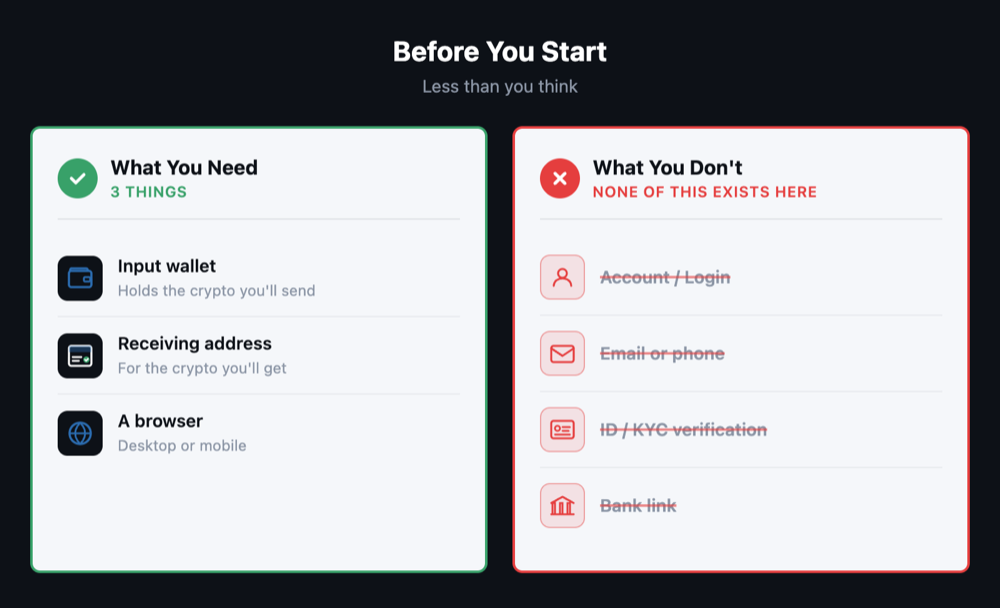
Less than you think. To complete a swap on Godex you need:
- A wallet holding the input crypto — the cryptocurrency you’re going to send. This can be any supported coin: BTC, ETH, USDT, XMR, anything from the 934+ list. You need it in a wallet you control (hardware wallet, software wallet, mobile wallet — whatever you already use).
- A wallet address for the output crypto — the cryptocurrency you want to receive. This is a different address from the input wallet, almost always in a different wallet entirely if the coins are on different blockchains. The receiving wallet must support the output crypto’s chain.
- A browser. Desktop or mobile. No app installation required. (There is also an Android app available if you prefer mobile-native, but the web flow is identical.)
Things you do not need: an account. An email address. A phone number. A scanned ID. A bank link. A trading history. A KYC verification. None of these exist as concepts on the platform.
Step 1: Pick Your Pair
Open godex.io. The exchange interface is the main thing on the front page. There are two crypto selectors and an amount field.
Pick the crypto you want to send in the first selector. Pick the crypto you want to receive in the second. Enter the amount you want to send. The interface will calculate the corresponding amount of the output crypto at the current rate.
The pair selectors search by ticker (BTC, ETH, XMR, etc.) and by full name. If you don’t see your pair immediately, type the name — the dropdown filters as you type. With 934+ supported coins, the list is large; the search is the fast way to navigate it.
A note on amounts: there are minimum and maximum bounds for each pair, displayed in the interface. The minimum exists because of network fees on the underlying chains; below a certain amount, the network fees would consume too much of the trade. There is no maximum from a Godex policy perspective — you can swap any amount the pair’s market depth supports. There are no tiered KYC triggers that activate above a threshold.
Step 2: Choose Fixed or Floating Rate
This is the most important decision in the whole flow, and it’s worth understanding before you click anything.
Fixed rate locks the exchange rate at the moment you initiate the swap. Whatever rate the interface shows you is the rate you’ll get when the deposit confirms — even if the market moves while you’re waiting for confirmations. The rate you see is the rate you receive. This is the right choice if you want certainty and don’t want to be exposed to short-term volatility during the swap window.
Floating rate gives you the rate at the moment the swap engine actually executes the trade, which is after your deposit confirms. If the market moves in your favor between initiation and execution, you get a better rate than the indicative quote. If it moves against you, you get a worse one. Floating rate is the right choice for users who want market exposure during the swap or are confident that the spread on fixed rate isn’t worth the certainty for their specific trade.
For most users, especially first-time users, especially for volatile pairs, fixed rate is the safer default. You’ll know exactly what you’re getting before you send anything.
Pick one. The interface lets you switch and shows you the difference in real time.

Step 3: Enter Your Receiving Address
This is where your output crypto will arrive. It’s the address of the wallet you control on the destination chain. Take a moment with this step — it matters.
Open your destination wallet (the one for the crypto you’re receiving). Copy a fresh receiving address from it. Paste it into the address field on Godex. Verify the first and last several characters of the pasted address against the address shown in your wallet. This is standard crypto hygiene and is the single best protection against clipboard hijack malware.
For some chains the interface will also ask for additional fields:
- Memo / tag for chains like XRP, XLM, BNB Beacon Chain. If your destination wallet requires a memo, the interface will tell you. Skipping a required memo can result in lost funds.
- Network selection for assets that exist on multiple chains (e.g., USDT on Tron vs. Ethereum vs. Solana). Make sure the network on Godex matches the network of your receiving wallet.
When in doubt, check your wallet’s documentation for the receiving address format. The cost of getting this right is one minute of attention. The cost of getting it wrong is potentially the entire trade.
Step 4: Send Your Deposit
Once you’ve confirmed the pair, the rate type, and the receiving address, the interface generates a deposit address — this is where you send your input crypto from your wallet.
Go to the wallet holding your input crypto. Initiate a send. Use the deposit address Godex generated. Send the exact amount the interface specified (this matters for fixed-rate trades especially — the locked rate is tied to the locked amount).
Network confirmation requirements vary by chain. Bitcoin and Litecoin take longer than chains like Solana or Tron. The Godex interface shows you the expected confirmation count for the input chain so you know what to watch for in your wallet.
A few practical notes:
- Don’t send a different amount than the one specified. For fixed-rate swaps, the locked rate applies to the exact amount you committed to. Sending more or less can result in a different rate or, in extreme cases, the swap not processing as expected.
- Don’t send from a custodial exchange wallet unless you’re sure the exchange supports that exact destination chain and won’t add fees, batch your transaction with others, or otherwise modify the transfer in ways that confuse the swap engine. Sending from a self-custodied wallet you control is the cleanest approach.
- Verify the deposit address one more time before clicking send. This is the last point at which you can catch a mistake.
Step 5: Wait
After you send the deposit, there’s nothing more to do. The swap engine watches the input chain for your transaction. Once it sees the deposit and confirms it has reached the required confirmation count, it executes the swap and sends the output crypto to your receiving address.
Typical end-to-end timing is 3 to 15 minutes after the deposit confirms on-chain, depending on the input and output chain confirmation requirements. Faster chains (Solana, Tron, BSC) finish at the fast end. Slower chains (Bitcoin in particular, especially under network congestion) take longer because the input deposit itself takes longer to confirm.
What’s happening behind the scenes during the wait:
- The swap engine sees your incoming transaction in the mempool
- It waits for the required number of confirmations
- It locks in the rate (for fixed-rate swaps, this was already done when you initiated; for floating, this is when it happens)
- It sends the output crypto to your destination address
If you’re watching the Godex transaction status page, you’ll see the state advance through these phases. You don’t need to keep the page open — you can close the browser. The swap will complete on its own and the output will arrive at the address you provided whether you’re watching or not.
Step 6: Receive
The output crypto arrives at your destination wallet. Open the wallet, refresh, verify the balance change. You’re done.
For most pairs and most network conditions, the entire flow from clicking “Exchange” to seeing the output in your wallet takes less than 15 minutes. For Bitcoin-input pairs during network congestion it can take longer because of the BTC confirmation time. For Solana-to-Solana or other fast-chain pairs it can be under five.
That’s the entire model. There’s no second swap to set up, no balance to withdraw, no fees to settle later. The transaction is complete.
What If Something Goes Wrong
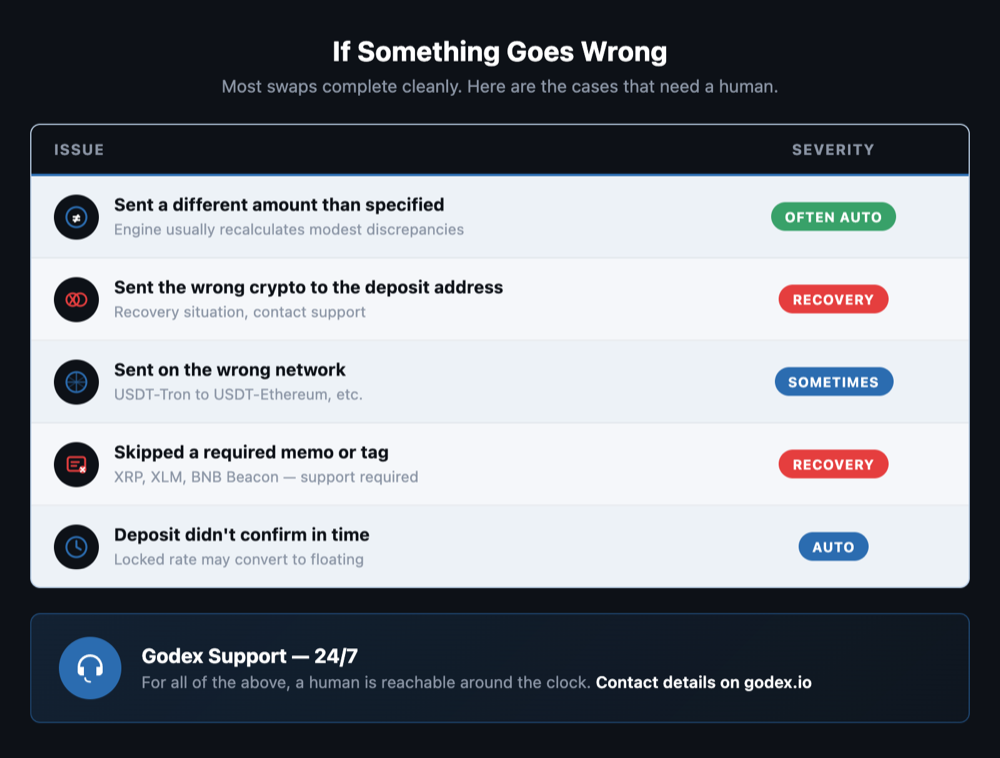
The honest section. Most swaps complete without any issue. The cases that need a human are uncommon but worth knowing about:
- You sent a different amount than the one specified. For fixed-rate swaps, the rate was locked to the exact amount. Most modest discrepancies are handled by the engine recalculating; significant ones may need support intervention.
- You sent the wrong crypto to the deposit address. The deposit address is for the specific input crypto you selected. Sending a different asset to that address is a recovery situation, not a normal transaction.
- You sent on the wrong network. USDT on Tron sent to a USDT-on-Ethereum deposit address is a common version of this. Recovery is sometimes possible, sometimes not — depends on the specific networks.
- You skipped a required memo. For chains that require memos (XRP, XLM, etc.), funds sent without the memo go to a generic platform address rather than your specific transaction. Recovery requires support contact.
- Your deposit didn’t confirm in time. Some swap engines have a deposit window after which the locked rate expires. If your input chain is congested and your deposit confirms after the window, the trade may convert to floating rate.
For all of these, Godex offers 24/7 customer support. The support channel is for the cases where something needs a human; for normal swaps you don’t need it. Contact details are on godex.io.
Why This Model Is Privacy-Friendly
You just completed a swap. Now it’s worth understanding what you did and didn’t do, from a privacy perspective.
You did not create an account. There is no profile in your name on Godex. There is no email address linked to the swap. There is no phone number, no ID, no KYC verification. Nothing on Godex’s side connects this transaction to you as a person.
The swap engine saw the transaction — input address, output address, amount. That’s the on-chain footprint, and it exists because every blockchain transaction is on-chain. What it does not see is you. There is no name attached to either of those addresses on Godex’s side.
If you want to maximize the privacy of the result, the practices that matter are: use a wallet for the input that has not been linked to a KYC source, generate a fresh receiving address on the output side, and use a VPN or Tor when interacting with the site so your IP address isn’t part of the visible footprint. None of these are required for the swap to work; all of them improve the privacy outcome.
For a deeper walk-through of operational privacy in 2026, see our companion piece How to Exchange Crypto Anonymously in 2026.
Tips for Repeat Users
A few habits that make life easier once you’re past your first swap:
- Use fixed rate for volatile pairs. The certainty is worth the small spread cost most of the time, especially for pairs where a 5% intra-window move is plausible.
- Bookmark godex.io. Don’t navigate to the platform via search — search results are a known vector for phishing sites. Bookmarking eliminates this risk entirely. (Remember: godex.io is the only official URL.)
- Maintain a clean wallet for privacy-sensitive swaps. Don’t reuse a wallet that has a KYC history. Wallet separation is the single most common difference between effective privacy and theatrical privacy.
- Save your transaction IDs. If something does need support, the on-chain TX IDs of the input deposit and the swap are the fastest path to a resolution.
- For very large swaps, do a small test trade first. Send a small amount through the same pair and confirm receipt before moving the full amount. The small test costs network fees only and gives you certainty about the route.
The Bottom Line
Your first swap on Godex.io takes about five minutes once you understand the model. Pick your pair, choose fixed or floating rate, paste your receiving address, send your deposit, wait for the swap to complete, receive the output. Repeat for any of the 934+ supported coins, at any amount, in any direction. No account. No KYC. No volume caps.
The platform has been operating on this model since approximately 2017. The reason it works is that the model is fundamentally simple: a non-custodial swap engine with enough liquidity to handle the pairs it supports, priced transparently, executed reliably. Everything in this guide is just the surface mechanics of that model. Once you’ve done one swap you’ve done them all.
Last updated: April 8, 2026. The official platform is at godex.io. godex.pro is a confirmed scam and is not affiliated with the real platform — always verify the URL in your browser before initiating a swap.
Start a Cryptocurrency exchange
Try our crypto exchange platform
Disclaimer: Please keep in mind that the content of this article is not financial or investing advice. The information provided is the author’s opinion only and should not be considered as direct recommendations for trading or investment. Any article reader or website visitor should consider multiple viewpoints and become familiar with all local regulations before cryptocurrency investment. We do not make any warranties about reliability and accuracy of this information.
Read more
You may well think that an article dedicated to a Tether price prediction or the Tether price in general is a little bit strange — it is a stablecoin after all. However, the price of Tether does fluctuate significantly, although it is nowhere near as volatile as non-stablecoin cryptos. This means that staying up to […]
In the article we share our vision at Zcash cryptocurrency main features and add several price predictions. As cryptocurrencies gain global acceptance and decentralisation slowly enters our lives, privacy becomes the main concern when talking about blockchain adoption. It is no secret that distributed ledger is by far the most secure and transparent technology ever […]
Chiliz coin (CHZ) offers a compelling opportunity for traders interested in the intersection of blockchain technology and sports. By enabling fans to influence team decisions through the Socios app, Chiliz directly monetizes fan engagement and connects with major sports teams like Juventus and Paris Saint-Germain. These partnerships not only enhance the platform’s visibility but also […]
The exponential growth of Bitcoin Satoshi Vision (BSV) against the general bear trend on the cryptocurrency market in autumn 2019 has impressed the community. Due to the increasing market capitalization, the newly emerged altcoin was ranked 5th on CoinMarketCap and managed to maintain its high position at the beginning of 2020. In the article we […]
EOS is definitely on the list of the strongest and most stable projects in the crypto world. Despite the fact that the currency entered the market less than 3 years ago, it consistently occupies one of the top 10 places in the rating for project capitalization. it is often called the “main competitor of Ethereum”. […]
XRP price prediction 2026-2027: bear, base, and bull scenarios with ranges and named sources, the resolved SEC case, live spot ETFs, and can XRP reach $10?