

Table of Contents
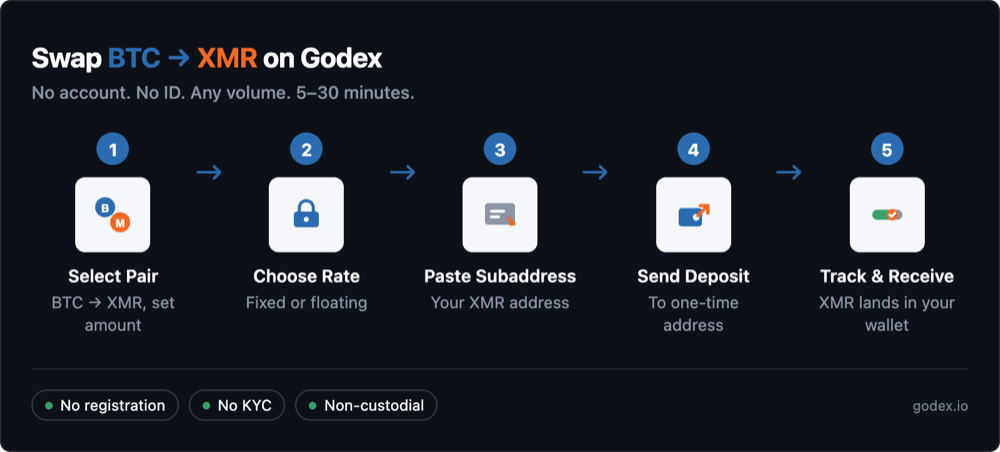
You can exchange Monero (XMR) on Godex.io in minutes without an account, without ID, and at any volume. Pick your pair, choose a fixed or floating rate, paste a Monero subaddress from your wallet, and send your input coin to the one-time deposit address Godex generates. The swap itself takes a few minutes once your deposit confirms; total time runs about 5–30 minutes depending on how fast the network confirms.
Why Swap Monero Instead of Buying It on an Exchange?
Because most major exchanges no longer list it. Binance, Kraken (in the EEA), and OKX delisted Monero citing regulatory compliance, so the practical way to get or move XMR in 2026 is a non-custodial swap rather than a centralized order book. If you want the regulatory background, read the full story on why exchanges delisted Monero or our breakdown comparing CEX, swap, and P2P methods.
Godex.io is a non-custodial instant cryptocurrency exchange operating since 2017. It supports 936+ coins — including Monero and other privacy coins competitors have delisted — requires no registration or KYC at any transaction size, and offers both fixed-rate and floating-rate swap modes. Total processing time is about 5–30 minutes, with the swap itself taking a few minutes once your deposit confirms.
What You Need Before You Start
You need three things: some crypto to swap (BTC, ETH, USDT, or any of 936+ supported coins), a Monero wallet to receive the XMR, and a browser. No account, no email, no ID.
- Crypto to swap from — held in any wallet you can send from (Trust Wallet, MetaMask, Ledger, Trezor, Exodus, or an exchange-managed wallet).
- A dedicated Monero wallet that gives you an XMR receiving address — Cake Wallet, Monerujo, or Feather Wallet. A non-custodial Monero wallet is one where you, not a third party, control the private keys.
- A browser — desktop or mobile.
Important: you need a real Monero wallet to receive XMR. General-purpose wallets like Trust Wallet and MetaMask cannot hold or receive Monero, so a normal “crypto wallet” won’t have an XMR address. If you don’t have one yet, install a dedicated Monero wallet first — Cake Wallet is the simplest on mobile: download it, create a new wallet, write down your seed phrase, and you’ll have a Monero receiving address in a couple of minutes.
What you do not need: no Godex account, no email, no phone number, no ID, passport, or selfie, and no cap on the high end — you can swap any volume. If you do not hold any crypto yet and are starting from fiat instead, see how to acquire crypto without KYC first.
Step 1 — Select Your Exchange Pair (BTC → XMR)
Open Godex — and before you do anything, check the address bar reads godex.io (bookmark it; fake look-alike sites exist). Then set the “you send” coin to BTC and the “you get” coin to XMR, and enter the amount you want to swap. Godex shows the estimated XMR output in real time.
We will use BTC → XMR as the worked example throughout this guide, because Bitcoin is the most common coin people swap into Monero. The flow is identical for any other pair — USDT→XMR, ETH→XMR, and the rest all work the same way. With 936+ supported coins, most input coins you already hold are covered.
When you are ready to run it for real, you can swap BTC to XMR on Godex directly from the pair page.
Step 2 — Choose Fixed or Floating Rate
Godex offers two rate modes. Fixed rate locks the quote at the moment you start the swap — the XMR amount you see is the amount you receive, regardless of market movement. Floating rate is set at execution and moves with the market until the swap completes.
Fixed rate holds the rate for the full duration of the transaction — typically a few minutes once your deposit confirms, and up to about 30 minutes if the swap runs long. You are paying for certainty: the rate you see is the rate you get. It is the better choice for larger swaps and for slow-confirming input chains, such as Bitcoin during network congestion.
Floating rate stays exposed to market movement during the confirmation window. It works best for smaller swaps on fast chains, where any drift over a few minutes is negligible.
Here is the practical frame, with no fee figures: on a large BTC→XMR swap, a few percent of market drift during processing is real money, and fixed rate removes that exposure entirely. On a small swap on a fast chain, that drift is trivial, so floating is fine. If you are doing this for the first time, fixed rate is the friendlier default.
Step 3 — Paste Your Monero Subaddress
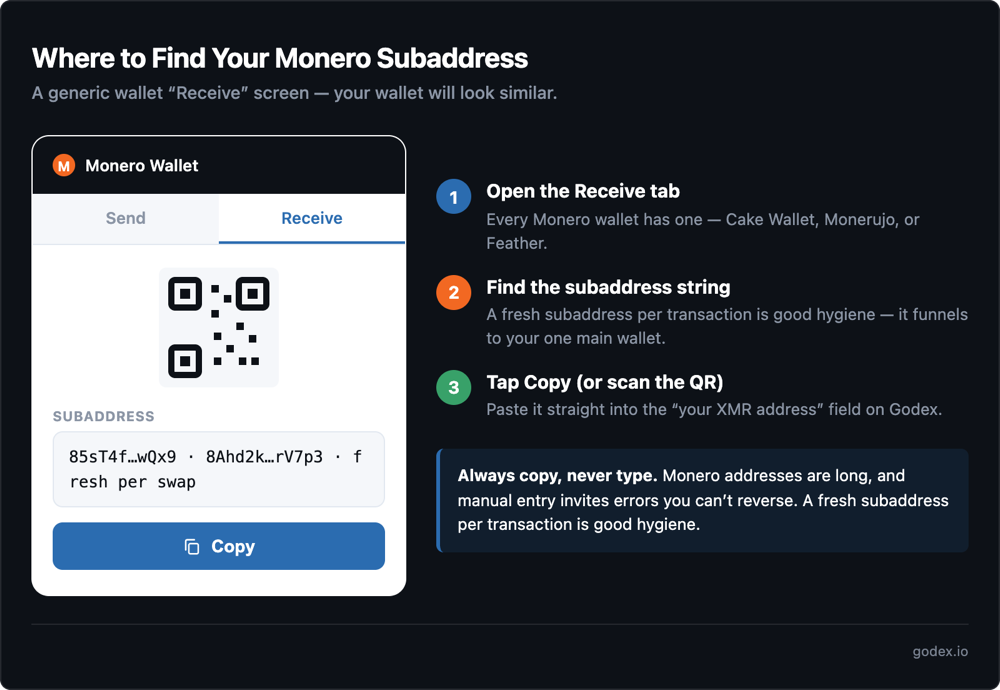
Paste the Monero receiving address from your wallet into the “your XMR address” field. Use a fresh subaddress from Cake Wallet, Monerujo, or Feather Wallet — and triple-check it before continuing.
Don’t let the word “subaddress” throw you. A subaddress is just a receiving address your Monero wallet generates that funnels into your one main wallet. A single wallet can create many of them. You don’t strictly need one — your wallet’s primary Monero address works fine too — but using a fresh subaddress for each transaction is standard Monero wallet hygiene and improves your operational privacy. getmonero.org documents how they work.
To get one: open Cake Wallet, Monerujo, or Feather Wallet, tap Receive, and copy the subaddress (or scan the QR code).
Copy the address — never type it. Monero addresses are long, and manual entry invites errors that can send your XMR somewhere you can’t recover it. Use copy-paste or the QR option every time. Monero’s privacy comes from protocol features called ring signatures and stealth addresses, which obscure the sender and the receiving address on-chain; you do not need to configure anything for them to work.
Step 4 — Send Your Deposit to the One-Time Address
Godex displays a one-time deposit address for this specific swap. Send your input coin (BTC in our example) from your wallet to that address, on the network Godex specifies.
A few rules keep this step clean:
- The deposit address is single-use for this swap. Do not reuse it for a future swap.
- Send the exact amount quoted. Under- or over-sending can delay the swap or change the rate.
- Match the network. For coins that live on multiple chains — USDT, for example — send on the exact chain Godex specifies (TRC20 vs ERC20).
- The QR code option works for the deposit address too, if you prefer scanning.
Once your deposit confirms on-chain, Godex starts the swap on its side.
Step 5 — Track Your Swap to Completion
Godex issues a transaction ID and a status page — no login needed. Watch it move through deposit received → exchanging → sending → complete. Your XMR lands in the subaddress you provided.
Because there is no account, you track everything by the transaction ID and status URL, which open on any device. The slowest part is usually the input chain’s confirmation: a BTC deposit under congestion is the slowest, while faster input chains move sooner.
If you want to verify on-chain, the status page gives you the transaction hash. You can paste it into a Monero block explorer — note that Monero explorers show limited detail by design, so a sparse result is expected, not an error. If a swap ever runs past about 30 minutes, Godex’s 24/7 support can pick it up with your transaction ID.
One question experienced users ask: on a fixed-rate swap, what if your input deposit (a slow BTC confirmation, say) lands after the locked rate window expires? Godex doesn’t simply pocket the difference — your funds aren’t lost. Depending on the market move, the swap is either re-quoted at the current rate or the deposit is refunded to your sending address, and 24/7 support resolves anything stuck with your transaction ID.
How Long Does a Monero Swap Take?
Total time runs about 5 to 30 minutes, depending mainly on how fast your input chain confirms. The Godex-side swap itself takes only a few minutes once your deposit confirms on-chain — a BTC→XMR swap takes longer than a fast-chain swap because Bitcoin confirmations are the bottleneck.
Godex’s own routing and execution are quick once your deposit confirms; the variable is the input chain. Bitcoin can take anywhere from 10 to 60 minutes depending on the fee you paid and network congestion, while faster chains confirm in minutes. The Monero output side then confirms on its own schedule after the swap executes.
Common Mistakes to Avoid
The mistakes that cost first-time Monero swappers their funds are almost always one of these: wrong receiving address, reusing a deposit address, wrong send amount, or the wrong rate mode.
- Don’t type the Monero subaddress by hand. Copy-paste or scan the QR. Long addresses plus manual entry equals lost funds.
- Don’t reuse a one-time deposit address from a previous swap — each one is single-use.
- Don’t send outside the quoted amount. Under- or over-sending can delay or re-rate the swap.
- Don’t pick floating rate on a slow-confirming input chain if the exact output amount matters to you.
- Don’t deposit anonymous XMR straight into a KYC exchange account later — it defeats the point of the no-ID swap.
- Don’t panic at a “pending” status for 10–20 minutes. Confirmation time depends on the chain, not on Godex.
Frequently Asked Questions
Do I need to verify my identity to swap XMR on Godex?
No. Godex requires no registration, no email, and no ID verification at any transaction size — including large swaps. There is no threshold that triggers KYC and no account to create. Order data is retained briefly for support purposes, then deleted.
What is a Monero subaddress and do I need one to receive XMR?
A subaddress is a receiving address your Monero wallet generates that funnels to your main wallet. You don’t strictly need one — your primary address works too — but a fresh subaddress per transaction is standard wallet hygiene. Note you do need a dedicated Monero wallet to get any XMR address at all: Cake Wallet, Monerujo, or Feather (under “Receive”). Trust Wallet and MetaMask can’t hold Monero.
Fixed rate or floating rate for a Monero swap — which should I choose?
Choose fixed rate for larger swaps or slow input chains: the XMR amount you’re quoted is the amount you receive, regardless of market movement. Choose floating rate for small swaps on fast chains, where market drift during the few-minute window is negligible. Fixed rate trades a small spread for certainty.
How do I exchange Monero without an account?
Use a non-custodial swap. Godex generates a one-time deposit address per swap and routes the trade wallet-to-wallet, so there’s no account, no balance held, and no login. You provide only your receiving Monero subaddress — no personal data attaches to the swap.
Can I swap any coin to Monero, or just Bitcoin?
Any of 936+ supported coins. BTC→XMR is the most common pair, but USDT→XMR, ETH→XMR, and others follow the identical flow: select the pair, choose a rate, paste your XMR subaddress, send the deposit, and track to completion.
Is swapping Monero legal?
Owning and swapping Monero is legal in most jurisdictions, including the US and UK. Restrictions apply to regulated EU/EEA exchanges (CASPs) rather than to individuals holding or swapping XMR — the EU’s AMLR reaches full effect in July 2027. Check the rules that apply where you live.
Start a Cryptocurrency exchange
Try our crypto exchange platform
Disclaimer: Please keep in mind that the content of this article is not financial or investing advice. The information provided is the author’s opinion only and should not be considered as direct recommendations for trading or investment. Any article reader or website visitor should consider multiple viewpoints and become familiar with all local regulations before cryptocurrency investment. We do not make any warranties about reliability and accuracy of this information.
Read more
XRP price prediction 2026-2027: bear, base, and bull scenarios with ranges and named sources, the resolved SEC case, live spot ETFs, and can XRP reach $10?
In this article we will talk about Ripple (XRP) and its price prediction. What is Ripple (XRP) Ripple is a San Francisco-based startup that was launched in 2012 by Ripple Labs as a global network both for cross-currency and gross payments. Ripple history began in 2004 with the discussions around the digital coin in the […]
You may well think that an article dedicated to a Tether price prediction or the Tether price in general is a little bit strange — it is a stablecoin after all. However, the price of Tether does fluctuate significantly, although it is nowhere near as volatile as non-stablecoin cryptos. This means that staying up to […]
In the article we share our vision at Zcash cryptocurrency main features and add several price predictions. As cryptocurrencies gain global acceptance and decentralisation slowly enters our lives, privacy becomes the main concern when talking about blockchain adoption. It is no secret that distributed ledger is by far the most secure and transparent technology ever […]
Chiliz coin (CHZ) offers a compelling opportunity for traders interested in the intersection of blockchain technology and sports. By enabling fans to influence team decisions through the Socios app, Chiliz directly monetizes fan engagement and connects with major sports teams like Juventus and Paris Saint-Germain. These partnerships not only enhance the platform’s visibility but also […]
The exponential growth of Bitcoin Satoshi Vision (BSV) against the general bear trend on the cryptocurrency market in autumn 2019 has impressed the community. Due to the increasing market capitalization, the newly emerged altcoin was ranked 5th on CoinMarketCap and managed to maintain its high position at the beginning of 2020. In the article we […]